Showing posts with label Python. Show all posts
Update to Notey

Update to Notey

This is just a quick update to last week's post about Notey - command line notebook. I have made a few bug fixes and added two new features that I will discuss in this post.

If you have been following this blog then you will know that Notey is a python script for creating and maintaining a command-line notebook. Literally a set of notes that you can easily manipulate, search and edit. Think of it like Google Keep but running in a command line on your Raspberry Pi.

Refs

Suppose you are writing a note about Topic A. Inside the note, you may reference Topic B and Topic C. At this point you realise that you need to have a new page called 'Topic B' and 'Topic C' respectively.

It may be the case that as you are typing a note, you need to create a second page (or many pages) for example. If you were to type:

> append My pets include one |cat|, one |dog| and one |unicorn|.

Notey will dutifully create new pages called 'cat', 'dog' and 'unicorn' respectively. The pipe symbols will be removed automatically from the page description, so your page will read "My pets include one cat, one dog and one unicorn."

Index

The comprehensive Notey help documentation that you know and love.

The new index feature of Notey allows you to generate an alphabetised index of all the words contained within your notes. The list shows the word and the pages in which that word exists. For example, if you know that you typed the words 'teenage', 'mutant', 'ninja' and 'turtle' somewhere in your notes, but you are not sure which notes, and indeed, how many other notes have the same information, then index will, well do what an index in a book does - shows you the page references for those words. 

You generate an index with the simple command:

> index

There are further options, for example, you can force Notey to NOT ignore the common stop words, such as 'and', 'she' and 'the'.

You can also force Notey to NOT ignore the shorter words in general (by default Notey will only list words of size four or above).

You can also create new pages on the fly. with the -c option, Notey will pause after each word and ask you whether you want to create a new page named as the current word, assuming it doesn't already exist.

Download

I am still actively developing Notey, so no doubt it will change further over time. If you are interested in finding out more or want to download the python code or the Windows executable, then all is explained in my first blog post on the subject.

If you parachuted into this page from somewhere else on the web, but you like the cut of my jib, then you might like to stick around and read some more of my stuff. I can recommend:


Notey: a command line notebook

Introducing Notey: command-line notebook.
The glorious ASCII graphics of another command-line session.

I have a real need to keep and remember short snippets of text, for example, my phone number, real name and world-domination plans. Over the years I have used many applications, such as OneNote, Google Keep, Zim, Treepad Lite, Sticky notes etc...etc, but I feel the need for a simpler app, one without any graphical fuss and nonsense. I want the same program to run just as well under Windows as it does under the Linux shell or on my Raspberry Pi. So, with the bit of time I have had on my hands in the current UK lockdown, I have built Notey: command line notebook.

Introduction

You can think of Notey as a bit like Google Keep, but you interact with a series of text commands. I am not 100% serious about this, however, it does work well and is quite powerful in terms of the actions you can perform on your data. There is a comprehensive help system built-in and the very first command you will want to learn is 'help'.
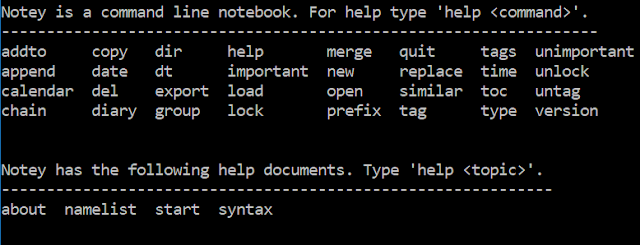
32 commands are available, but you are not expected to remember them all.

Making new pages

Notey is simply a big list of named 'pages'. The first thing you will want to do is create a new page. This is achieved with the 'open' command, for example:

> open cat
This will prompt you to create a new page called 'cat'.
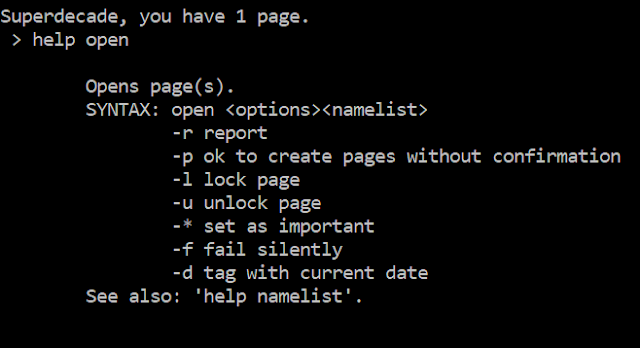
The in-built help documentation for the 'open' command.

As you can see, the 'open' command is used for creating new pages as well as opening existing pages. Most commands in Notey can take various options as parameters (shown above), for example, if you are really sure that you want to create a new page called 'cat' (and not open an existing page called 'cat'), you could type the following:
> open -p cat
Commands can take multiple options, for example:

> open -rpl*d cat

Will create a new page called 'cat', lock it so it cannot be accidentally deleted, automatically tag it with today's date and mark it as 'important'. The option -r then returns a little report showing you what Notey has been up to whilst you were waiting, as you can see in the image below.
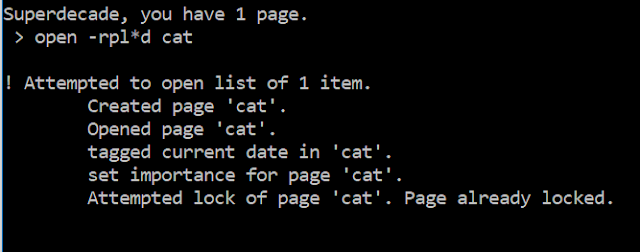
Isn't everyone's cat important?

Editing pages

When you have a page open, you will see the page name appears just before the prompt. Pages that are thus 'opened' can be edited in a number of ways. You are most likely to want to add some text to this page.

For example, you could try the following command:

> append Not a dog.

This will enter the text "Not a dog." into this page. Except - it probably won't! You will get an error. Remember how we locked the page in the previous command? Locked pages cannot be (accidentally) edited, so we have to specify that we intend to purposefully unlock our page, edit it and then lock it again.

Try:

> append -ul Not a dog.
> append -ul Like's fishes.

OK. Big wow! You will probably want to see your handiwork. To view a page on the screen, simply type:

> type
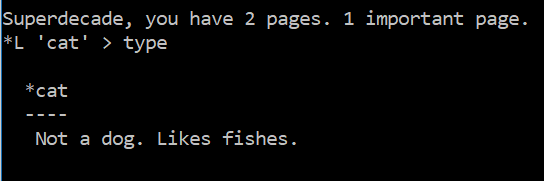
Notey has rather helpfully done a lot here. It has reminded me of my own name, as well as the number of pages I have written. It is showing me that my page 'cat' is currently open and that it is 'locked' and 'important'. When I type 'type', I get to read the note on the screen.


Currently, there are related commands for editing your pages, for example: 'prefix' and 'replace', but append will do for now.

Tags

Pages in Notey can be tagged so you can find related information easily.

Let's tag our page with a list of tags:

> tag pets,animals

This will add two tags, 'pets' and 'animals' to the current 'cat' page. We already tagged our page with the current date with the 'open -d' command earlier. Forgotten already? I don't know! Actually, it is easy to get a little confused at times when using Notey, but thankfully there are a number of ways of getting information on what you are doing.

Table of contents

You will want to see what pages you have available in your notebook. The 'toc' command brings up a table of contents. You may want additional information such as a page summary, or list of tags.

Try:

> toc -t

This will display all the pages in the book including a summary of the tags for each page.
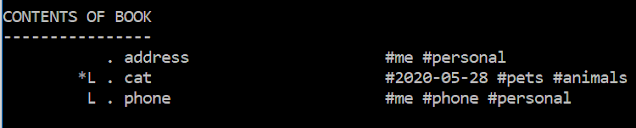
Now I will never forget my own address again.

You can also specify a search term to filter the table of contents. For example, need to see only those pages with 'cat' in the title? Try:

> toc -t cat

If you need more advanced filtering then you need to get your head around the 'group' command.

Grouping

Groups allows you to group pages based on a search term or tag name or other property. This allows you to apply commands to all the pages in the group. For example, if you need to add the text 'remember to feed' to all pages with 'cat' in the description, that have been marked as 'important' and have been tagged as '#animals', then you need to get your head around groups.

> group -t pets

Will find all of the pages with a tag '#pets' and put them into the group.

> toc -t@

Will show the table of contents for the current group.


If you search the help documents for the various commands, you can see that the '@' symbol refers to 'all pages in the group'. For example, if you want to append some text to all the pages in the group, try:

> append -@ Remember to feed.

OK - admit it! How many note-taking apps let you edit multiple pages at the same time?

This is the power of groups in Notey. There is also an 'addto' command, which allows you to manually add pages to the group, and the 'similar' command, which lets you see similar pages.

Similar pages

OK, so, you have spent your time carefully categorising your notes with sensible names and a comprehensive library of tags. Now, it is time for the 'similar ' command. It groups pages from your notebook that are 'similar' to the currently open page.

Namelists

You will frequently want to apply the same command to multiple pages at once. This is where namelists come in.

Try:

> open cat,dog,unicorn

This will prompt you to create three pages called 'cat', 'dog' and 'unicorn' respectively.

You can use the '@' symbol to refer to the current group. For example:

> del cat,unicorn,@

Will prompt you to delete the pages called 'cat', 'dog' and whatever pages are in the current group.

Other stuff, briefly...

A quick tour of some of the other features of Notey.

Your pages can be exported to XML, HTML, plain text or Treepad Lite files.

My Notey notebook as a Treepad lite file (OK, more about Treepad lite another time - spoiler alert - it is no longer a thing but that does not mean it is gone forever!)

You can use Notey as a diary. Simply type:

> diary

This creates a page with the current date for you to record all of your evil machinations from the day (or your good deeds).

You can get a calendar for any month (within reason):

> calendar 2020 06
Next month. Unless you are living in the future (which you most likely are) in which case you know more about June 2020 than I do. It can't get any worse can it? Can it?! Why are you laughing??!

Chain

Notey can accept multiple commands on one line using the 'chain' command.

Eg:

> chain open cat; tag animals; lock

In this case, Notey will diligently open the page 'cat', tag it '#animals' and then lock it. It is vital that each command is separated by a semi-colon.

Future updates

Some things that still need doing:
  • importing pages from files;
  • running scripts from a file;
  • hiding sensitive data;
  • exporting to other formats (MS-Word, anyone?)
There are, no doubt, many bugs, and a lot that could be done more efficiently. But the source code is provided for your entertainment.

Th..th..that's all folks!

Well, that's it for this introduction. I hope you can see that Notey is a powerful personal information management system. There is much more that it can do, but you will have to explore this yourself. Remember it is just for fun and not super secure so it is not a good idea to store sensitive information at this stage.

Notey is currently in an alpha release stage. You are free to download either the python source code or the Windows executable version and do what you like with it. I am sure that I will be adding more functionality soon, and I will be encouraged by anyone who finds it useful - so Tweet ME.


...or click this OneDrive link below...


If you enjoyed this post, then it shows that you have great taste, and you might like to read more of my stuff

Brute force Travelling Salesman Problem in Python

I did not make it into work today. A blanket of snow - dubbed the Pest from the West - hit the North of England causing gridlock in many areas. Instead, I got to stay at home and write a Travelling Salesman simulation in Python.

The Travelling Salesman Problem (TSP) is a problem in Computer Science used to demonstrate intractability and optimisation. In short, imagine a salesman who wishes to visit every one of N cities exactly once each. The salesman does not care which order he visits the cities as he is equally proficient in applying is selling skills in them all regardless. All that matters is that he takes the shortest route between them all before returning back to the start, where, presumably Alan Sugar is waiting in the boardroom to fire him if he has failed in this task.

The Python 3 code below will run a TSP simulation by attempting to solve the problem by brute force. This is, of course, the worst method for solving the problem, being factorial of N time complexity, but it is presented here in the hope that it is of some use to students.

A solution for 10 cities

The simulation in mid-animation

A solution for 9 cities

Here is a photo of me failing to complete the TSP for 2 cities. 
The Python code can be copied from below, or you can download it from my OneDrive. Enjoy!


# Travelling Salesman by Brute force
# superdecade games
# version 2.1
# 2018-03-08

import itertools
import turtle
import time
import math
import random

class Salesman(object):
	"""Travelling Salesman by Brute force"""
	# in this program a route is represented by a list of coordinates
	# where each coordinate is a tuple containing an x,y coordinate
	# in the range 0-1000,0-1000
	def __init__(self):
		self.__city = [] #list for holding city coords
		self.__num = 0 # number of cities in simulation
		self.__animate = False # True if should show animations
		self.__speed = 100 # Speed of animations 100 is fastest
		self.__wn = turtle.Screen() # turtle window
		turtle.setworldcoordinates(0, 0, 1000, 1000)
		self.__wn.title("TRAVELLING SALESMAN")
		self.__cityPen = turtle.Turtle() # pen for drawing cities
		self.__cityPen.shape("circle")
		self.__cityPen.hideturtle()
		self.__routePen = turtle.Turtle() # pen for drawing routes
		self.__routePen.pensize(5) 
		self.__route = [] # list of possible routes
		self.__bestRoute = None # current best route
		self.__bestLength = 1000000 # a big number	
	
	def main(self):
		"""Main test program"""
		self.__title()
		self.__setup()
		self.__generate()
		self.__showCities()
		try:
			self.__getRoutes()
			t0 = time.clock() # start tinmer
			for i in self.__route:
				thisLength = self.__calculateLength(i)
				if thisLength <= self.__bestLength:
					self.__bestLength = thisLength
					self.__bestRoute = i # store the best route so far
				if self.__animate:
					self.__showRoute(i)
					time.sleep(0.01)
					self.__routePen.clear()
			#show the best route
			print("\nDone. Showing best route")
			print(time.clock() - t0, "seconds")
			self.__showRoute(self.__bestRoute, "green")
			input()
			self.__cityPen.clear()
			self.__routePen.clear()
			self.__routePen.hideturtle()
			self.__cityPen.hideturtle()

		except Exception as e:
			print("Ooops, that was an error. Too many cities?")
				
	def __setup(self):
		"""Gets users choices for the simulation"""
		ok = False
		while not(ok):
			try:
				num = int(input("Enter number of cities: "))
				if num>1 and num < 11:
					self.__num = num
					ok = True
				else:
					print("Invalid!")
			except Exception as e:
				pass
		choice = input("Show animation for all? (Y/N): ")
		if choice.lower() in "yes":
			self.__animate = True
			ok = False
			while not(ok):
				try:
					speed = int(input("Select speed (1-10): "))
					if speed >= 0 and speed <= 10:
						self.__speed = speed ** 2
						ok = True
					else:
						print("Try again")
				except Exception as e:
					pass

	def __generate(self):
		"""Creates random cities"""
		for i in range(self.__num):
			x = random.randint(0,1000)
			y = random.randint(0,1000)
			self.__city.append((x,y))
	
	def __showCities(self):
		"""Display cities on the canvas"""
		self.__cityPen.speed(0)
		self.__cityPen.penup()
		for i in range(self.__num):
			self.__cityPen.goto(self.__city[i][0],self.__city[i][1])
			self.__cityPen.stamp()
	
	def __getRoutes(self):
		"""Find all combinations of routes"""
		trylist = list(itertools.permutations(self.__city))
		#remove duplicates
		for i in trylist:
			if i[0] == trylist[0][0]:
				self.__route.append(i)
	
	def __showRoute(self, this, color="red"):
		"""Show a route passed as paramter on the canvas"""
		self.__routePen.color(color)
		self.__routePen.speed(self.__speed)
		self.__routePen.penup()
		for i in this:
			self.__routePen.goto(i[0],i[1])
			self.__routePen.pendown()
		self.__routePen.goto(this[0][0],this[0][1])
			
	def __calculateLength(self, this):
		"""Returns the length of route 'this'"""
		d = 0
		for i in range(1,len(this)):
			d += math.sqrt( (this[i][0]-this[i-1][0])**2 + (this[i][1]-this[i-1][1])**2)
		return d			
	
	def __title(self):
		"""Displays the title"""
		print("Travelling Salesman Problem")
		print("      (by brute force)")


while True:
	app = Salesman()
	app.main()

Levidromes

A levidrome is a word that when spelled backwards makes another word.

Well, at least not yet. It is not in the Oxford English Dictionary.

Levi Budd is a six-year-old boy from British Columbia in Canada who has coined the term 'levidrome' after spotting that the word 'STOP' spells 'POTS' backwards. After realising that there is no such word in English for this phenomena, a social media campaign has started to get this word in popular usage (hence this post).

I wrote a short Python script this morning that will pull all of the levidromes from a dictionary file. The full list is copied below.


aa
ab
aba
abac
abba
abo
abos
abut
acca
ad
ado
ados
ae
aga
agar
agas
agenes
ah
aha
ahs
aia
aider
air
airts
ajar
aka
al
ala
alan
alif
alma
alula
am
ama
amahs
amas
amen
amene
amir
amis
amla
amman
an
ana
anal
anan
anana
anes
anew
anger
animal
animes
anna
annat
anon
ante
apod
araara
arak
arb
arbas
are
ares
arf
aril
arret
arris
arum
arval
aryl
assam
asses
at
ataata
ate
ates
aua
auks
ava
aval
avel
avid
avo
awa
ay
ayahs
ba
bac
bacs
bad
bag
bal
bals
ban
bans
bard
barf
bark
bas
bat
bats
bed
beef
ben
bens
bib
bid
big
bin
bins
bird
bis
blub
bo
bob
bobac
bobak
bod
bog
boh
bok
bon
bonk
boob
boord
bor
bos
bots
bows
boy
bra
braced
brad
brag
braw
bro
brod
bros
bru
bub
bud
bug
bulb
bun
bunk
buns
bur
burd
burg
bus
but
buts
cab
caba
cabob
cam
camus
cap
card
cares
cep
ceps
cire
cires
cis
cit
cite
cito
civic
clat
cod
cor
cos
cot
cram
cran
crem
cur
da
dab
dace
dad
dag
dah
dahs
dal
dam
dap
daraf
darb
darg
dart
darts
das
daud
daw
daws
day
de
deb
debut
decaf
decal
decarb
dedal
deed
deem
deen
deens
deep
deeps
deer
dees
deet
deets
def
defer
deffer
deffo
deg
degami
degged
deid
deified
deifier
deil
deke
deked
del
deled
delf
delis
deliver
delos
dels
deman
demit
demits
den
denier
denies
denim
denis
denned
dennets
dens
depart
deport
depot
depots
derat
derats
dere
dered
deres
deros
derris
dessert
desserts
deus
devas
devil
devils
devots
dew
dewans
dewed
dexes
deys
di
dial
dialer
dials
diaper
dib
did
died
dif
dig
dim
din
dinar
diol
diols
diram
dit
div
diva
do
dob
doc
dod
dog
doh
dohs
dol
dom
don
dons
doom
door
dop
dopa
dops
dor
dorb
dormin
dorp
dorps
dort
dorter
dos
doser
dot
doy
drab
drac
drail
dram
drap
draps
draw
drawer
draws
dray
drey
drib
drier
droob
drool
drow
drows
drub
duad
dual
dub
dud
duel
duo
dup
dups
ea
ean
eas
eat
ecad
ecce
ed
edile
edit
ee
eel
eels
een
ef
eh
ehs
eke
eked
elide
elides
elutes
em
eme
emes
emir
emit
emits
emmets
emong
emos
en
ene
enema
enes
enol
enows
er
era
ere
ered
eres
ergo
eric
eros
ervil
eses
esnes
espial
esse
et
eta
etas
etat
etats
eten
etic
etna
euk
eve
even
evil
eviler
evils
ewe
exul
eye
faced
farad
fe
fed
feeb
feer
fen
fer
fet
fid
fier
fig
fila
fir
fires
fled
flog
flor
flow
fool
fra
frab
fret
fro
gab
gad
gag
gal
gals
gam
gan
gans
gaps
gar
garb
gas
gat
gateman
gater
gats
gay
ged
gel
gelder
gem
gen
get
gib
gid
gif
gig
gins
gip
girt
girts
git
gnar
gnat
gnats
gnaw
gnaws
gnome
gnus
gob
god
golf
gon
gons
goog
gorp
gorps
gos
got
grad
gram
grub
gu
gub
gul
gulp
guls
gum
gums
guns
gup
gups
gur
gut
guv
guy
ha
habus
had
hadedah
hah
hahs
hajjah
halalah
hales
hallah
hallan
halos
han
hap
haram
hay
he
heh
henry
hep
her
hey
ho
hob
hod
hoh
hon
hoo
hoop
hop
hos
huh
hup
id
ikat
imaged
io
iris
iron
is
it
itas
iwi
jar
kabob
kaiak
kak
kam
kara
kat
kay
kayak
keek
keel
keels
keep
keet
keets
ken
keps
kier
kips
kirks
kis
kiths
knaps
knar
knit
knits
knob
knop
knot
knots
know
knub
knuts
kob
kook
kor
korat
kow
krab
krans
kue
la
lab
laced
lacer
lad
laded
laer
lag
lager
laid
laipse
lair
lam
lamina
lana
langer
lap
lares
larum
las
laud
lava
lavra
leat
leben
led
lee
leek
leep
leeps
leer
lees
leet
leets
leg
leir
lemel
leper
les
let
leud
leva
level
lever
levins
levo
lez
liar
liard
liart
lias
lied
lies
lin
lion
lira
lit
live
lived
livre
lobo
lod
loges
loid
lone
loof
looks
loom
loons
loop
loops
loord
loos
loot
looter
loots
lop
los
lotos
lug
luxe
lyra
ma
mac
macs
mad
madam
maes
mag
mak
mal
malam
mallam
mals
mam
man
map
maps
mar
marah
marc
marcs
mard
marg
marid
marram
marrum
mart
mas
massa
mat
maws
may
me
meed
mees
meet
meets
meg
mem
merc
meter
mets
mew
mho
mid
milks
mils
mim
mined
minim
mips
mir
mis
mm
mo
mod
mom
mon
moo
mood
mool
mools
moops
moor
moos
moot
mop
mor
mos
mot
moy
mu
mug
mum
mura
mural
mures
murram
mus
mut
muton
muts
na
naan
nab
nae
nag
nah
nala
nallah
nam
named
namer
nametag
namma
nan
nana
nap
napas
nappas
naps
naras
narc
narcs
narks
nas
nat
naw
ne
neb
nebel
ned
nee
need
neep
nef
neg
nek
neks
nelis
nema
nemas
nep
net
nete
nets
neve
neves
new
nib
nid
nil
nimrod
nip
nips
nis
nit
no
nob
nod
nog
noh
noil
nolos
nom
non
nona
nonet
noo
noon
noop
noops
nori
nos
not
notes
notum
now
noy
nu
nub
nun
nur
nus
nut
nuts
nys
oat
ob
oba
obey
obo
obol
od
oda
odas
offed
offer
ogre
oh
ohm
oho
ohos
oi
oiks
om
on
ono
oo
ooh
oohs
oom
oon
oop
oor
oot
op
oppo
orb
orf
os
otic
otto
oud
ova
ovel
ow
owt
oxo
oy
pac
pacer
pad
pah
pal
palp
pals
pam
pan
pans
pap
par
pard
part
parts
pas
pat
pats
paw
paws
pay
pec
peed
peek
peel
peels
peen
peep
pees
peh
pelas
pen
peons
pep
per
perp
perts
pets
pig
pin
pins
pip
pir
pis
pit
plap
plug
po
pod
poh
pol
pols
pom
ponk
poo
pooh
pool
pools
poon
poons
poop
poor
poort
poos
poots
pop
port
ports
pos
pot
pots
pow
pows
prat
prep
prod
prog
pud
pug
puh
pullup
pup
pupils
puris
pus
put
puy
radar
rag
raga
rager
rages
raggas
rail
rait
raj
raja
ram
ramis
rang
ranid
rank
rap
raps
ras
rast
rat
rats
raw
ray
re
real
reaps
rebus
rebut
recal
recap
recaps
reccos
redder
redes
redia
redips
redleg
redraw
redrawer
reed
reef
reeks
reel
reels
reens
rees
ref
refed
refer
reffed
reffo
reflet
reflow
regal
regar
regna
regnal
regos
reh
reif
reified
reifier
reik
reiks
reined
reird
reknit
reknits
reknot
reknots
relaid
relit
relive
reliver
reman
remeet
remit
renies
rennet
rep
repaid
repaper
repel
repins
repot
repots
res
resat
resod
retag
retem
retool
retrod
retros
revel
reviled
reviler
reviver
reward
rewarder
rewets
rexes
ria
rial
rias
ribas
riel
rif
rim
rima
rime
rims
rip
rits
rob
roc
rod
rok
rolf
rom
rones
roo
rood
room
rooms
roop
roops
roots
rosies
rot
rotator
rotavator
rotor
rub
ruc
rucs
rug
rums
run
sab
sabir
sabra
sad
sadis
sado
sados
sae
sag
saga
sagas
sagenes
saggar
sail
sair
sakis
sal
salep
salles
sallets
sam
sama
samas
samen
san
sanes
sap
sapan
sappan
saps
sar
saran
saros
sarus
sat
sate
sati
sav
saved
saw
saz
scab
scam
scares
scot
scram
scran
scur
seals
seam
seat
secret
seder
sedes
sedile
seed
seeks
seel
seem
seems
seep
seer
sees
segar
segol
seil
seined
seiner
seis
seisor
seities
sekos
sel
selah
selahs
seles
sellas
selles
seme
sememes
semes
semina
sena
senas
sene
senega
senegas
sennet
senor
sense
ser
sera
serac
seracs
seral
sere
sered
seres
seric
serif
serons
serres
serum
sese
sesey
sessa
sesses
set
seta
seton
setule
seven
sexed
sexer
sexes
sey
seys
sha
shad
shah
shahs
shakos
shales
shama
shay
shaya
she
shod
shoo
shtik
si
sib
sic
sidas
sies
sik
sikas
siled
silen
sim
sima
simar
simis
sin
sined
sinnet
sip
siri
siris
sirra
sirred
sirs
sirup
sis
sit
six
skat
skeer
skees
skeets
sken
skeps
skier
skio
skips
sklim
skool
skran
skrans
skrik
skua
slab
slaes
slag
slaid
slam
slap
sled
slee
sleek
sleep
sleeps
sleer
sleet
sleets
slim
slipup
slit
slive
slived
sloid
sloom
sloop
sloops
sloot
sloots
slop
slug
smart
smees
smew
smir
smits
smoor
smoot
smug
smur
smut
smuts
snab
snag
snap
snaps
snark
snarks
snaw
snawed
snaws
sneb
sned
sneed
sneer
snib
snig
snip
sniper
snips
snirt
snit
snivel
snod
snoep
snog
snool
snoop
snoops
snoot
snores
snort
snot
snow
snub
snug
so
sob
soba
soc
soccer
sod
soda
sodas
sog
soger
soh
soho
sokahs
sokes
sol
solah
soled
solon
solos
som
some
son
sonnet
sool
soom
soop
sop
soras
sorb
sore
sored
sorter
sos
sotol
sow
soy
spacer
spaer
spag
spam
span
spank
spans
spar
spard
spart
sparts
spas
spat
spats
spaw
spaws
spay
spaz
spec
speed
speel
speels
spek
speks
spets
spider
spik
spiks
spim
spin
spins
spirt
spirts
spit
spod
spool
spools
spoom
spoon
spoons
spoor
spoots
sports
spot
spots
sprat
sprits
sprod
sprog
spud
spug
sris
stab
stag
stang
stap
staps
star
stared
start
stat
state
stats
staw
staws
steed
steek
steeks
steel
steels
steem
stellas
stem
stemme
sten
stenned
step
steps
stet
stets
stew
stewer
stime
stimed
stims
stink
stinker
stir
stirps
stob
stonk
stonker
stool
stools
stoop
stoops
stoor
stop
stoped
stoper
stops
stot
stots
stoved
stow
stows
strad
strap
straps
straw
strep
stressed
stria
strig
strips
strop
strops
strow
struts
stub
stum
stums
stun
stunk
sturts
sub
subah
suber
succus
sued
sulu
sulus
sum
sumac
sun
sung
sup
suras
sus
susus
swad
swam
swang
swans
swap
swaps
sward
swat
swats
sway
swey
swob
swone
swop
sword
swot
swots
syed
syes
syn
ta
tab
tae
tael
taes
tag
tak
taki
taks
talc
tallat
tam
tan
tang
tanna
tao
tap
taps
tar
tared
tarok
tarp
tarps
tart
tas
taser
tat
tate
tats
tav
taw
taws
te
teed
teek
teel
teels
teem
teemer
tef
teg
tel
telfer
ten
tenet
tenner
tennes
tennis
tennos
tenon
terces
terf
terra
terret
tes
tet
tets
tew
ti
tiar
tic
tid
tide
tig
til
tiler
tils
time
timed
timer
tin
tink
tinker
tins
tip
tips
tirrit
tis
tit
toc
tocs
tod
tog
tom
ton
tonk
tonker
tons
too
tool
tools
toom
tooms
toons
toot
top
toped
toper
tops
tor
torot
tort
tot
tots
tow
tows
trad
trail
tram
trams
trap
traped
traps
trat
trats
tressed
trew
trig
trins
trips
trod
trons
troop
trop
troped
trot
trow
tsar
tub
tuba
tubed
tuber
tug
tum
tums
tun
tup
tut
two
ug
ulu
ulus
um
umu
un
urb
utu
vas
vat
vav
vid
vug
wad
wan
wang
wans
wap
waps
war
warb
ward
warder
warts
was
wat
wats
waw
way
wed
wem
wems
wen
wena
wert
wet
wets
wey
wo
wok
wolf
wolfer
won
wonk
wons
wop
word
wort
worts
wos
wot
wots
wow
xis
ya
yad
yag
yah
yahs
yak
yam
yap
yaps
yar
yard
yaw
yaws
yay
yebo
yeh
yerd
yes
yeses
yew
yews
yo
yob
yod
yom
yon
yos
yrneh
yug
yup
zaps
zas
zel
ziz
zuz
zzz


It is interesting to note that some levidromes are also palindromes. I wonder whether we need a new word to describe this phenomenon also?  Furthermore, there is no word in English for "a word that you make up in order to make another word make sense". I suggest: "emordivel" ?

Label

World Karma Game