

Some facts:
The Earth has been known to be a globe ever since the ancient Greeks noticed that the shadow of the Earth was circular in shape during a lunar eclipse (the only object that can cast consistent circular shadows is a sphere). Eratosthenes calculated the circumference of the Earth with surprising accuracy by comparing the lengths of shadows at different places on the Earth. Space agencies from around the globe have been to space and taken photographs of Earth - and, spoiler alert - the globe is spherical.
There are experiments that you can perform yourself. Go to the beach and watch ships sail over your horizon. You will notice that the ships disappear from the bottom up as they sail over the curve (and no, a pair of binoculars will not bring the ship back into view). Watch a sunset from a low vantage point, such as your vacation beach hut, then quickly run up a convenient hill and you will notice that you get another sunset as your higher vantage point allows you to see further around the curve of your horizon. If you ever travel to a country in the opposite hemisphere, apart from the fact that your flight plan will have been calculated to be very close to a great circle on the ball Earth, but there will be some phenomena that cannot be explained on a flat earth, for example, you will see a different hemisphere of stars to your view back home. The sun and moon will appear to traverse the sky in the opposite direction (actually, they still move East to West, but their position in the North or South of the sky will make it look as though they are moving counter to your expectation). This was the first thing that I noticed when I travelled to New Zealand, arriving at night I saw the moon travelling from the East into the Northern sky and then I noticed the large and small Magellanic Clouds which are impossible to see from the Northern Hemisphere.
There are two models for understanding the solar system. One of these models, the helio-centric, globe earth model manages to explain all phenomena that we observe and can be used to make accurate predictions about both celestial events and the motion of objects on or near the surface of the planet.
The other model - the so-called Flat Earth - is not really a model at all as it makes for a poor representation of reality, explains very little of observable phenomena and can make almost no predictions. In fact, Flat Earth proponents cannot even agree on what the model should be although the common themes are a flat (sometimes infinite) plane, with the moon and sun as smaller than scientists think rotating several thousand miles above the surface of the plane. The stars are unknown points of light stuck to a glass dome, and there is an 'ice wall' preventing the oceans from falling off. Even the best Flat Earth explorers have failed to successfully photograph the ice wall or the dome. Flat Earth astronomers do not seem to care that their models do not successfully represent the reality of the southern celestial hemisphere.
Followers of the Flat Earth need to reject almost all of Newton's Laws of motion in order for their model to make even a partial sliver of sense. Neil deGrasse Tyson has blamed the conspiracy theory’s rise on “free speech” and a “failed educational system” which does not promote critical thinking. Gravitational effects are explained as simply 'density' and 'buoyancy', although, in fact, buoyancy is an epiphenomenon of gravity, Flat Earth scientists ignore this whilst simultaneously sticking fingers in their ears and saying 'La La La' very loudly. The existence of satellites and even outer space itself is rejected completely by Flat Earth proponents. The daily motion of the sun and sky is explained away as simply a trick of 'perspective'.
I could go on.
I haven't even mentioned the observation by all Flat Earth astronomers that the surface of a body of water looks flat, or that they cannot feel the dizzying 15 degrees per hour rotation of the Earth at the equator (you would not expect to feel such a slow rotation).
But I decided to do some research that I do not believe anyone else has done before. I shall simply find all the apps in the app store that rely on an helio-centric, round earth model, and then compare them with apps that have been written using a Flat Earth model. Whichever model gets the most high-quality, accurate and useful apps wins!
Apps for Round Earthers
First up is Google Earth.

Based on countless satellite images of a spherical Earth, Google Earth provides a virtual 3D model of the Earth. I am not sure how this would be achieved if satellites did not exist. You can add your own data to the model, such as flight plans, and if the Google were lying to us about the shape of the planet, then it would have have been discovered by countless aeronautics enthusiasts by now.


One of many apps that add real-time information to maps. This one lets you track thunderstorm.This one is called Blitzortung Lightning Monitor.

One of my favourite apps is Sunrise Sunset. The 3D view shown here allows you to track the position of the sun at your location as it conforms to reality. You can go outside and check that the sun is where it should be. Notice the simplicity of the Heliocentric model, yet it perfectly explains all observations from anywhere on Earth. I can't wait to see the Flat Earth version of this application.

One of the achievements of a working scientific model is that it can be used to make accurate predictions even if we do not actually understand the underlying physics. The motion of planets and asteroids can all be predicted far into the future and you can also go outside and check whether the model matches your reality. The screenshot above is from Asteroid Alert.
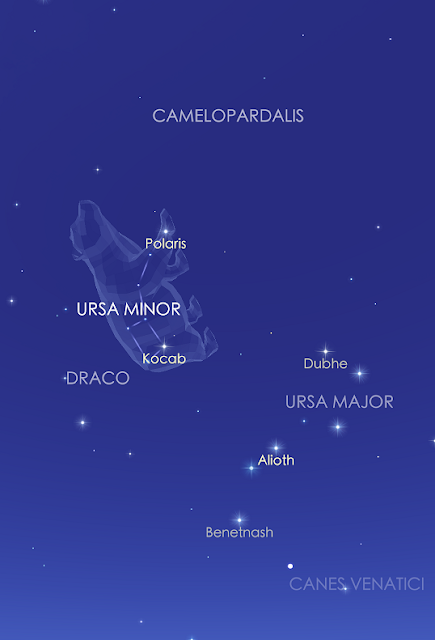
Your smartphone is essentially a mobile planetarium. There are countless awesome planetarium apps available across multiple platforms. The one shown here is Sky Walk 2 for Android. Again, you can check that the model matches the reality around you. Note for the confused - the picture of the bear is just an aid for your imagination. I am not sure how an accurate astronomy app for Flat Earthers would work (that is dealt with at the bottom of this page), although I imagine it would have to be drawn with crayons.

One of several apps for viewing live feeds from the International Space Station. The one shown is ISS Live. I don't need much more proof than my ground-based observations suggesting a globe Earth being corroborated by a space-based camera. The ISS orbits at a relatively low orbit, but it is high enough for you to see the curvature of the Earth. You would not expect to see any curvature from an aeroplane. My challenge for the Flat Earth movement: start in Australia, get a good telescope and a hot-air balloon. Go up. Take a picture of the Eifel Tower in France. This should work for your 'model'. The interesting thing about ISS and other satellite tracking software is that you can wait for the object to pass over your head as indicated in the app, then go outside and watch it happen yourself. This happens because the software uses an accurate model of reality.

Here some software is written for the BBC Microcomputer, which even though it is thirty years old is still accurately predicting lunar eclipses. It does this because it is based on an accurate model of the solar system.

Here is some BBC Micro software for tracking the position of the day/night terminator on the Earth for any day of the year. Although there are many modern versions of this software, including www.timeanddate.com, I still use my trusty 8-bit version. This works for a globe planet. It does not work for the southern 'hemisphere' of a flat earth. The reason for this is because the flat earth model is nonsense.
I shall conclude this section be simply saying that there are countless apps for various platforms that rely on an accurate model of reality, or technology such as satellites that also rely on an accurate model of reality.
Let's now look at apps that use the flat earth model. I really can't wait to see what the world's best flat earth astronomers and flat earth software engineers have come up with.
Apps for the Flat Earth
um...

Gosh!

Oh!

Oh dear!
 Aw!
Aw!
Well, I'll leave it there and let you make your own mind up. If you liked this post, then you might like to read some other posts about the solar system, or maybe the BBC Microcomputer.
If you really hated this post then you probably think that gravity is a lie told to you by globe manufacturers to promote sales or something. Either way, you can post comments on my noticeboard.
- the Earth is an oblate spheroid;
- the Earth and Moon orbit the Sun, which is a star approximately 150 million km away;
- gravity holds water, people and animals as well as politicians and accountants to the surface of the planet. It is this force that is also responsible for the orbits of the planets.
If the Earth was flat, then cats would have pushed everything off the edge by now.
 |
| Eratosthenes calculated the circumference of the Earth in the third century BCE. Later mathematicians then calculated the circumference of Eratosthenes' forehead with remarkable accuracy. |
The Earth has been known to be a globe ever since the ancient Greeks noticed that the shadow of the Earth was circular in shape during a lunar eclipse (the only object that can cast consistent circular shadows is a sphere). Eratosthenes calculated the circumference of the Earth with surprising accuracy by comparing the lengths of shadows at different places on the Earth. Space agencies from around the globe have been to space and taken photographs of Earth - and, spoiler alert - the globe is spherical.
There are experiments that you can perform yourself. Go to the beach and watch ships sail over your horizon. You will notice that the ships disappear from the bottom up as they sail over the curve (and no, a pair of binoculars will not bring the ship back into view). Watch a sunset from a low vantage point, such as your vacation beach hut, then quickly run up a convenient hill and you will notice that you get another sunset as your higher vantage point allows you to see further around the curve of your horizon. If you ever travel to a country in the opposite hemisphere, apart from the fact that your flight plan will have been calculated to be very close to a great circle on the ball Earth, but there will be some phenomena that cannot be explained on a flat earth, for example, you will see a different hemisphere of stars to your view back home. The sun and moon will appear to traverse the sky in the opposite direction (actually, they still move East to West, but their position in the North or South of the sky will make it look as though they are moving counter to your expectation). This was the first thing that I noticed when I travelled to New Zealand, arriving at night I saw the moon travelling from the East into the Northern sky and then I noticed the large and small Magellanic Clouds which are impossible to see from the Northern Hemisphere.
There are two models for understanding the solar system. One of these models, the helio-centric, globe earth model manages to explain all phenomena that we observe and can be used to make accurate predictions about both celestial events and the motion of objects on or near the surface of the planet.
The other model - the so-called Flat Earth - is not really a model at all as it makes for a poor representation of reality, explains very little of observable phenomena and can make almost no predictions. In fact, Flat Earth proponents cannot even agree on what the model should be although the common themes are a flat (sometimes infinite) plane, with the moon and sun as smaller than scientists think rotating several thousand miles above the surface of the plane. The stars are unknown points of light stuck to a glass dome, and there is an 'ice wall' preventing the oceans from falling off. Even the best Flat Earth explorers have failed to successfully photograph the ice wall or the dome. Flat Earth astronomers do not seem to care that their models do not successfully represent the reality of the southern celestial hemisphere.
Followers of the Flat Earth need to reject almost all of Newton's Laws of motion in order for their model to make even a partial sliver of sense. Neil deGrasse Tyson has blamed the conspiracy theory’s rise on “free speech” and a “failed educational system” which does not promote critical thinking. Gravitational effects are explained as simply 'density' and 'buoyancy', although, in fact, buoyancy is an epiphenomenon of gravity, Flat Earth scientists ignore this whilst simultaneously sticking fingers in their ears and saying 'La La La' very loudly. The existence of satellites and even outer space itself is rejected completely by Flat Earth proponents. The daily motion of the sun and sky is explained away as simply a trick of 'perspective'.
I could go on.
I haven't even mentioned the observation by all Flat Earth astronomers that the surface of a body of water looks flat, or that they cannot feel the dizzying 15 degrees per hour rotation of the Earth at the equator (you would not expect to feel such a slow rotation).
But I decided to do some research that I do not believe anyone else has done before. I shall simply find all the apps in the app store that rely on an helio-centric, round earth model, and then compare them with apps that have been written using a Flat Earth model. Whichever model gets the most high-quality, accurate and useful apps wins!
Apps for Round Earthers
First up is Google Earth.

Based on countless satellite images of a spherical Earth, Google Earth provides a virtual 3D model of the Earth. I am not sure how this would be achieved if satellites did not exist. You can add your own data to the model, such as flight plans, and if the Google were lying to us about the shape of the planet, then it would have have been discovered by countless aeronautics enthusiasts by now.

This is Google Maps, although there are other map applications out there. I am not sure how Flat Earthers think their satellite navigation system works without the existence of satellites, presumably some sort of ground-based perspective magic, however later this week I shall trust this application to navigate me on a 600-mile round journey. I shall expect to arrive at the same place I set off from.

One of many apps that add real-time information to maps. This one lets you track thunderstorm.This one is called Blitzortung Lightning Monitor.

One of my favourite apps is Sunrise Sunset. The 3D view shown here allows you to track the position of the sun at your location as it conforms to reality. You can go outside and check that the sun is where it should be. Notice the simplicity of the Heliocentric model, yet it perfectly explains all observations from anywhere on Earth. I can't wait to see the Flat Earth version of this application.

One of the achievements of a working scientific model is that it can be used to make accurate predictions even if we do not actually understand the underlying physics. The motion of planets and asteroids can all be predicted far into the future and you can also go outside and check whether the model matches your reality. The screenshot above is from Asteroid Alert.

Your smartphone is essentially a mobile planetarium. There are countless awesome planetarium apps available across multiple platforms. The one shown here is Sky Walk 2 for Android. Again, you can check that the model matches the reality around you. Note for the confused - the picture of the bear is just an aid for your imagination. I am not sure how an accurate astronomy app for Flat Earthers would work (that is dealt with at the bottom of this page), although I imagine it would have to be drawn with crayons.

One of several apps for viewing live feeds from the International Space Station. The one shown is ISS Live. I don't need much more proof than my ground-based observations suggesting a globe Earth being corroborated by a space-based camera. The ISS orbits at a relatively low orbit, but it is high enough for you to see the curvature of the Earth. You would not expect to see any curvature from an aeroplane. My challenge for the Flat Earth movement: start in Australia, get a good telescope and a hot-air balloon. Go up. Take a picture of the Eifel Tower in France. This should work for your 'model'. The interesting thing about ISS and other satellite tracking software is that you can wait for the object to pass over your head as indicated in the app, then go outside and watch it happen yourself. This happens because the software uses an accurate model of reality.

Here some software is written for the BBC Microcomputer, which even though it is thirty years old is still accurately predicting lunar eclipses. It does this because it is based on an accurate model of the solar system.

Here is some BBC Micro software for tracking the position of the day/night terminator on the Earth for any day of the year. Although there are many modern versions of this software, including www.timeanddate.com, I still use my trusty 8-bit version. This works for a globe planet. It does not work for the southern 'hemisphere' of a flat earth. The reason for this is because the flat earth model is nonsense.
I shall conclude this section be simply saying that there are countless apps for various platforms that rely on an accurate model of reality, or technology such as satellites that also rely on an accurate model of reality.
Let's now look at apps that use the flat earth model. I really can't wait to see what the world's best flat earth astronomers and flat earth software engineers have come up with.
Apps for the Flat Earth
um...

Gosh!

Oh!

Oh dear!

Well, I'll leave it there and let you make your own mind up. If you liked this post, then you might like to read some other posts about the solar system, or maybe the BBC Microcomputer.
If you really hated this post then you probably think that gravity is a lie told to you by globe manufacturers to promote sales or something. Either way, you can post comments on my noticeboard.


